A password alone is no longer enough. 2FA adds a decisive security layer against credential theft. A complete overview of mechanisms, approaches and available solutions.
A password can be guessed, phished, or leaked in a compromised database. Two-factor authentication (2FA) starts from a simple observation: to access an account, it is not enough to know something — you must also possess something or be someone. This combination makes credential stuffing attacks virtually ineffective.
The mechanism
Multi-factor authentication relies on combining at least two types of identity proof:
- Something you know: password, PIN, secret answer
- Something you possess: phone, physical key, hardware token
- Something you are: fingerprint, facial recognition, voice
Classic 2FA combines the first factor (password) with the second (device). Here is the typical flow:
- The user enters their username and password
- The server validates the first factor and triggers the 2FA challenge
- A code is generated (server-side or device-side depending on the method)
- The user submits this code within the allotted time
- The server validates and grants access
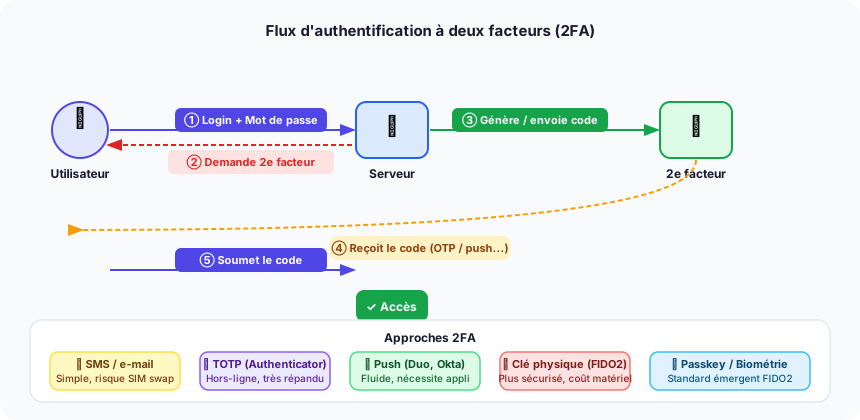 Full 2FA flow: from password to access granted, covering the five main approaches.
The approaches
SMS and email
The server sends a one-time password (OTP) by SMS or email. This is the simplest approach to implement and the most familiar to users. Its Achilles' heel: SIM swapping — an attack where a hacker convinces the carrier to transfer the phone number to their own SIM card. For critical applications (banking, healthcare), this method is insufficient.
TOTP — Time-based One-Time Password
The application generates a 6-digit code that changes every 30 seconds, based on a shared secret established during enrollment (via QR code) and the current time. Validation is offline: no network connection is required on the device side. This is the most widely used method in enterprise environments.
Main TOTP clients:
- Google Authenticator — simple, no native cloud backup
- Microsoft Authenticator — integrated with the Azure AD / Entra ecosystem
- Authy — encrypted cloud backup, multi-device support
- 1Password / Bitwarden — TOTP built into the password manager
Push notifications
Instead of a code, the user receives a notification on their phone: "Approve this sign-in?". This is the smoothest approach in terms of UX. It requires a dedicated application and a network connection on the secondary device.
- Duo Security (Cisco) — widely used in enterprise, also supports TOTP and FIDO2
- Okta Verify — integrated into the Okta platform
- Microsoft Authenticator — native push for Microsoft/Azure accounts
Physical FIDO2 / WebAuthn keys
A hardware key (USB, NFC, Bluetooth) generates a unique cryptographic signature per site, making phishing impossible: the key only responds to the real domain. This is the highest security level, recommended for accounts with elevated privileges.
- YubiKey (Yubico) — market reference, supports FIDO2, TOTP, PIV
- Google Titan Key — Google's alternative, FIDO2 only
- OnlyKey — open source, integrated password storage
Passkeys and biometrics
Passkeys are the next generation: an asymmetric key pair tied to a device, unlocked by biometrics (Touch ID, Face ID, Windows Hello). The user never types a password again. The FIDO2 / WebAuthn standard is supported by Apple, Google, Microsoft, and most modern browsers. It is currently the most phishing-resistant method and the simplest for the user.
Main identity providers (IdP)
For web applications, delegating authentication to a dedicated provider is almost always the right decision:
| Provider | Strengths | Native 2FA |
|---|---|---|
| Auth0 (Okta) | Flexibility, SDKs | SMS, TOTP, push, WebAuthn |
| Keycloak | Open source, on-premise | TOTP, WebAuthn |
| Firebase Authentication | Google integration, free tier | SMS, TOTP |
| AWS Cognito | Native AWS, scalable | SMS, TOTP |
| Okta | Enterprise, SSO | All factors |
| Microsoft Entra ID | Microsoft ecosystem | Push, TOTP, FIDO2 |
Why adopt it now
According to Microsoft, 2FA blocks 99.9% of automated attacks on accounts. Implementation is now trivial thanks to libraries and IdPs. The only real cost is UX — and passkeys are solving that last obstacle. For any application handling sensitive data, payments, or admin access: 2FA is no longer optional.