Multiple screens, chronic pain, extended keyboards, quiet environment: developer workstation ergonomics is not a luxury. It's a direct investment in work quality, long-term health and the pleasure of coding.
A developer spends an average of six to eight hours a day in the same position, eyes fixed on one or more screens, hands on a keyboard. Multiplied over a twenty-year career, that's thousands of hours in a posture that, poorly managed, can generate debilitating chronic pain. Workstation ergonomics is not a superficial comfort issue — it's a discipline that directly impacts productivity, concentration and professional longevity.
The multi-screen trap
Two screens have become the norm in many development teams, and the promise seems obvious: more surface, more efficiency. Reality is more nuanced. A second screen positioned to the side forces repeated neck rotations — a classic source of cervical pain and trapezius tension. The solution isn't to go back to a single screen, but to position correctly: the main monitor directly in front of the eyes, the secondary slightly recessed and at a reasonable angle.
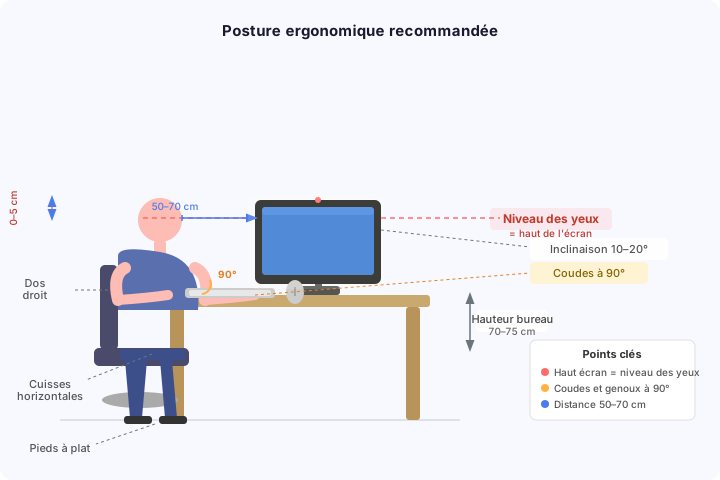
A large screen — from 27 inches upward — mechanically reduces the need for a second monitor while providing enough space for multiple windows side by side. The ultrawide (34 to 49 inches, 21:9 or 32:9 format) pushes this further: same surface area as a dual-screen setup, a single line of sight, no bezels, and significantly smoother window management.
Curved models (typically 1000R to 1800R) have a genuine physiological justification: the curve matches the natural radius of the visual field, reducing eye movement to the edges of the screen and decreasing visual fatigue over long sessions. This is one of the few "premium" claims validated by ergonomic research — curved ultrawide screens are recognized to reduce eye strain compared to dual flat-screen setups.
Three or more screens crosses a threshold where attention fragmentation becomes the primary problem. Studies on cognitive load show that productivity isn't linear with display surface: beyond a certain threshold, managing windows and contexts costs more than it gains. A good window manager (i3, Magnet, Rectangle) and virtual workspaces often advantageously replace a third monitor.
Chronic pain: prevent rather than cure
Musculoskeletal disorders (MSDs) are the leading cause of occupational illness in sedentary professions. Carpal tunnel syndrome, tendinitis, cervical pain, lower back pain: all share the common factor of inappropriate postures held too long.
Preventive levers are well documented:
- Adjustable chair at the right height: feet flat, thighs horizontal, elbows at 90°
- Height-adjustable desk: alternate between sitting and standing every hour
- Vertical mouse or trackball to reduce wrist pronation
- Active breaks every 45 to 60 minutes — the Pomodoro technique has physiological virtue as much as cognitive
- Targeted stretches: neck, forearms, wrists, pectorals
The first signal not to ignore is mild, recurring pain. Waiting until it becomes chronic multiplies recovery time tenfold.
Extended keyboards and shortcuts: taking control of gestures
The keyboard is the developer's primary tool — and yet most use whatever came with their machine without thinking about it. Investing in a good mechanical keyboard adapts the gesture to the hand and reduces fatigue.
Compact keyboards (60% or 75%) keep hands closer together and avoid lateral movements toward the mouse.
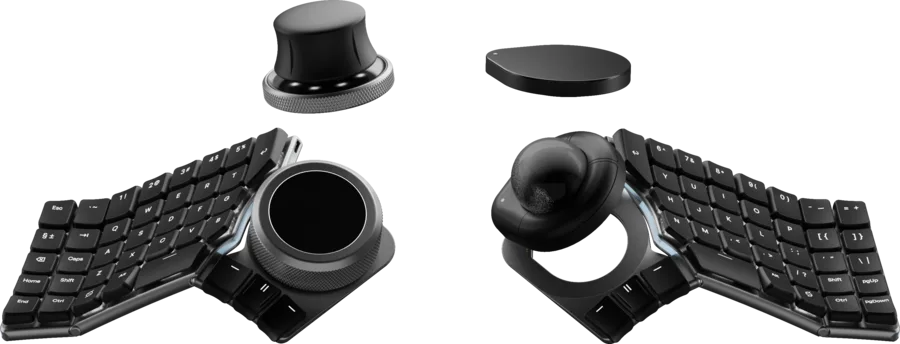
Ergonomic splits like the Kinesis Advantage or ErgoDox allow a more natural shoulder position, arms aligned. More recent projects push even further: the Naya Create is a modular split keyboard that integrates a trackball, touchpad or haptic dial directly between the two halves. The hand never leaves the rest position — even for navigation or value adjustments.
Switching keyboard layout is a radical but effective option. Dvorak — or its variants like Colemak — redistributes the most frequent letters to the home row, theoretically reducing finger travel by 30 to 40% compared to QWERTY or AZERTY. Studies on MSD reduction remain mixed, but subjective comfort after the transition is often significant. The main obstacle: two to three months of transition during which typing speed drops sharply. It's an investment to schedule during a quiet period, not in the middle of a sprint.
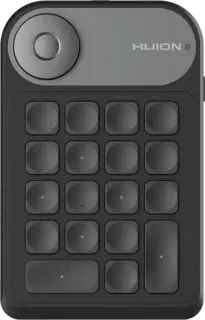
For advanced shortcuts and macros, programmable keypads genuinely change working habits. A compact model — around twenty fully customizable keys and a scroll wheel — is enough to turn the non-dominant hand into a trigger: snippets, running tests, volume control, tab navigation, without ever leaving the main keyboard.
This type of peripheral, originally designed for graphic designers, has been widely adopted by developers for its near-unlimited configuration possibilities. It offloads the most frequent gestures to the non-dominant hand, freeing the other for continuous typing.
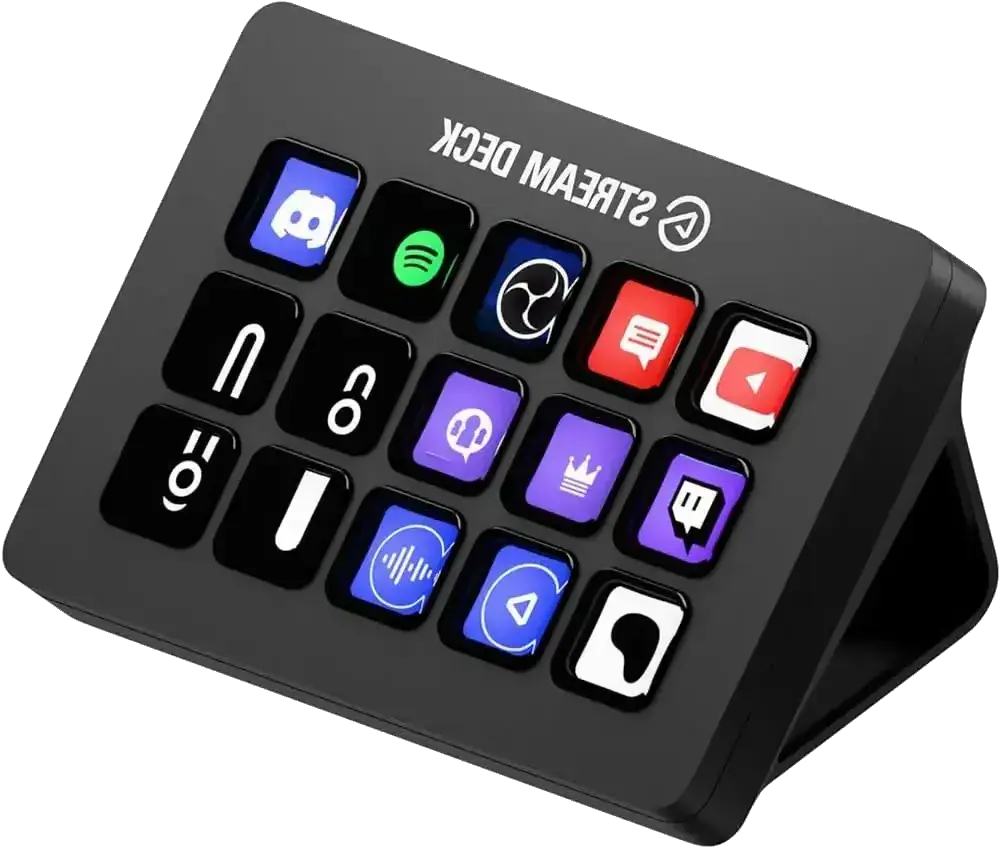
On the more premium end, Elgato's Stream Deck is a pricier but particularly polished alternative. Its keys are small, fully customizable LCD screens — each button displays an icon matching the assigned action. Launching a script, switching Git profiles, triggering a CI pipeline, muting in a video call: the possibilities are extensive and the learning curve is minimal. The price remains a barrier, but for someone constantly juggling tools, terminals and applications, it's a worthwhile investment.
Quiet environment: the condition for deep work
Background noise — open spaces, adjacent meetings, notifications — is the number one enemy of deep concentration. An interrupted developer takes an average of twenty minutes to regain their concentration level. In an eight-hour day, four interruptions can cancel two hours of effective work.
Active noise-cancelling (ANC) headphones have become a full-fledged work tool for many developers. Models like the Sony WH-1000XM or Bose QuietComfort offer enough acoustic isolation to mentally step out of an open office without needing a separate quiet room. ANC doesn't replace a silent environment — it attenuates continuous ambient noise (ventilation, distant conversations) while letting important alerts through. Pairing it with music or white noise amplifies the cut-off effect further.
A quiet environment is also the condition for using voice dictation effectively. Transcription tools (Whisper, macOS dictation, Dragon) now achieve sufficient accuracy to dictate text, comments, even specifications — provided ambient noise is controlled. For developers with wrist pain, dictation can partially replace typing on writing tasks.
Lighting and visual fatigue
The screen should never be the brightest light source in the field of vision. Indirect backlighting behind the monitor (bias lighting) reduces the contrast between screen and background, decreasing visual fatigue during long sessions. The 20-20-20 rule: every twenty minutes, look at an object twenty feet (~6 m) away for twenty seconds, relaxing the ciliary muscles.
Color temperature should evolve with the time of day: cool light (6500K) in the morning for alertness, warm light (3000K) in the evening to avoid disrupting sleep. Tools like f.lux or Night Shift automate this transition. A calibrated monitor avoids the unconscious compensation efforts the eye makes against poor white balance.
Managing distractions by design
The digital environment is designed to capture attention. Slack notifications, email badges, news feeds: every interruption has a cognitive cost. The solution isn't willpower — it's default configuration.
Enable Do Not Disturb mode by default during deep work sessions, disable badges on non-urgent applications, use a site blocker during Pomodoro sessions. These aren't personal productivity tricks — they're workstation environment architecture decisions, exactly as you think about the architecture of a software system.
→ See also: The Pomodoro technique · The GTD method · Day-to-day software craftsmanship